Resources and answers
Articles, a sample scope, browser demos, a payback calculator, and straight answers to the questions buyers usually ask about automation for Autodesk® Revit® software.
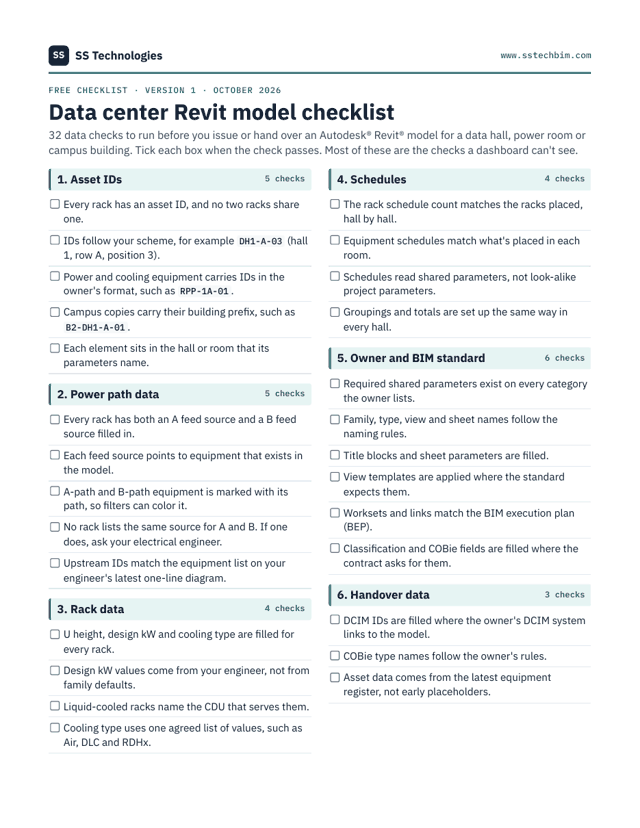
The data center Revit model checklist.
32 data checks to run before you issue or hand over a model: asset IDs, A/B feed fields, rack data, schedules, your owner's standard, handover data and model health. Two pages, ready to print.
Use these today.
These are on this site, open to read, and free. No forms and no email gate.
Sample scope & acceptance test
A full sample of the written scope you get after a scoping call: deliverables, inputs, the acceptance test, schedule, fixed price, warranty and IP. Fictional project. Print it or save it as a PDF from the page.
Printable page
Payback calculator
Enter the hours one task takes, how many people do it and your hourly cost. It estimates the yearly cost of the task and how long a tool takes to pay back. The math runs in your browser.
Calculator
Browser demos
Three small tools that run, on sample data, the kind of rules our Revit tools apply. They're browser demos with sample data, not client work. Recorded Revit demos will be added as they're published.
3 demos
Demo: rack rows & IDs
Number a data hall to a scheme like DH1-A-03 (hall, row, position) and see how IDs change when the layout does.
Demo: A/B feed check
Compare each rack's A and B feeds with a one-line equipment list and see which ones don't match, for example a rack on RPP-1A-01 that should be on RPP-1B-01.
Demo: sheet list builder
Build a sheet list for every data hall from a naming pattern, then download it as a CSV file.
Technical articles, written by the person who writes the code.
Practical notes for BIM managers, design technology leads and in-house developers. Each one cites its sources.
October 2026 · Revit API · about 6 minutes
.NET 8 support ends November 2026: what it means for your Revit add-ins
Which runtime each Revit version uses, why Revit 2025.5 and 2026.5 moved to .NET 10, what tends to break, and a step-by-step migration checklist.
Read the articleOctober 2026 · Dynamo & pyRevit · about 6 minutes
Dynamo vs pyRevit vs C# add-in: which one for which job
A side-by-side comparison, a decision checklist, data center examples, and what to watch for at upgrade time, including PythonNet3 and the pyRevit license.
Read the articleMore articles will be added as they're published.
Checking out a new vendor? Start here.
The pages your vendor review usually needs, in one place. Each one is written in plain English, and we'll answer anything they don't cover in writing.
| Your question | Where to look |
|---|---|
| How do you handle our files? NDA? Data deletion? | Security, NDA & IP |
| Who owns the code and the content? | Who owns what, in three parts |
| Payment terms, acceptance, warranty, stopping early | Engagement terms in plain English |
| Prices and what's excluded | Pricing (prices exclude any applicable taxes) |
| What does a scope look like before we sign? | Sample scope and acceptance test |
| Company facts for the vendor file | About SS Technologies |
| Privacy and website terms | Privacy policy · Terms of use |
| Trademarks and affiliation | Trademark notice |
| Accessibility of this website | Accessibility statement |
Need a vendor onboarding pack or have a security questionnaire? Email shreyanshshende57@gmail.com. The pack includes the tax form for our entity, banking details, and a certificate of insurance where required. Security questionnaires are welcome.
The terms on this site, explained in one line each.
- Add-in (plugin)
- Compiled code, usually written in C#, that adds commands to the Revit ribbon. Autodesk calls them add-ins; many people say plugin. Same thing.
- Revit API
- The programming interface Autodesk publishes so add-ins and scripts can read and change Revit models.
- Dynamo
- A visual programming tool that works with Revit. You connect nodes into a graph instead of writing code.
- Dynamo Player
- A simple window for running Dynamo graphs with a few inputs, without opening the graph itself.
- pyRevit
- An open-source environment for building Revit tools in Python or C#, often used for a company tab of small tools.
- Autodesk Platform Services (APS)
- Autodesk cloud services for developers. Its Automation API runs Revit jobs in the cloud without a desktop, which is useful for batch work across many models.
- Transaction
- A group of model changes that Revit treats as one step. Our tools make changes inside transactions, so you can undo them.
- Acceptance test
- A short written test, agreed in the scope before work starts, that defines what "done" means. You run it on your model.
- COBie
- A spreadsheet format for handing building asset data to the owner. When it's required, it's required through the project contract.
- DCIM
- Software operators use to track racks, power and space in a running data center.
- RPP
- A panel in the data hall that distributes power to racks. Dual-corded racks get an A feed and a B feed from separate paths.
- CDU
- Equipment that moves coolant between the facility water system and the liquid-cooled racks.
Questions buyers usually ask
Short, direct answers. If yours isn't here, email shreyanshshende57@gmail.com and you'll get a written reply within one US business day.
Getting started
You're a new company. Why should we trust you with our models?
Fair question. SS Technologies started in October 2026, so we don't have client references yet, and we won't invent them. Here's what you can check instead:
- browser demos of the rules our tools apply, on sample data
- a sample written scope and acceptance test
- published prices
- a written security and IP policy you can hold us to
You don't have to take a big risk to find out. We recommend starting with a $500 health check or a fixed-price pilot with a written acceptance test.
Can we start small?
Yes. We recommend starting with a model health check ($500 per model) or a pilot ($750–$1,500). Both have fixed prices and clear deliverables, and the scoping call is free.
What is a pilot?
A small, fixed-price project that automates one task. We agree in writing what "done" means. For example: "creates all sheets for one data hall from the Excel list, with correct names and title block, and undoes cleanly." You test it on your own model against that written acceptance test.
If the pilot doesn't pass the written acceptance test on the agreed Revit version, we fix it at no charge. If it still doesn't pass within 10 business days of your test report, we refund the pilot fee in full. This doesn't cover changes to the scope, the test model or the Revit version after the scope is signed.
What do you need from us?
- A person who knows the task and can test the tool, for about 1–2 hours a week
- A sample model or access to one, after the NDA is signed
- Your standards documents, and any rule values your engineer of record sets
- Revit licenses for your users
More detail: what you provide.
What software do we need?
Full Autodesk Revit or the AEC Collection. Revit LT doesn't run add-ins or Dynamo. Clash automation needs Navisworks® Manage, because Navisworks Simulate has no Clash Detective. Shared dashboards need Power BI licenses for viewers. Cloud jobs may use Autodesk Platform Services (APS) usage billed by Autodesk to your account.
How long does it take?
Estimated times:
- Model health check: 3 business days after we get access
- Pilot: 1–2 weeks
- Data center family and template kit: 2–4 weeks
- Custom C# add-in: 2–8 weeks
Your written scope includes the date.
When can we talk live, and how fast do you reply?
Written questions get a reply within one US business day. Live calls are scheduled within US business hours by arrangement, on Teams, Zoom or Google Meet. During a project you get a short demo every week, and one point of contact: the person writing your code.
Do you work outside the US?
We focus on US design and construction teams today. If you're in the UK, Europe or Australia, get in touch and we'll tell you honestly whether we can help.
Cost & payment
What does it cost?
- Model health check: $500 per model
- Pilot script: $750–$1,500
- Data center family and template kit: $2,500–$6,000
- Custom C# add-in: $4,000–$15,000
- Monthly retainer: $2,000–$4,000 a month
Within 2 business days of the call you get a written scope with a fixed price for a pilot or first phase, and an estimate range for anything bigger. The price changes only if you ask for changes, and we quote every change first. Prices exclude any applicable taxes. See pricing.
Why is a large build given as a range?
Because a big tool is easier to price well once the first phase is done and you've seen it work. You get a fixed price for the pilot or first phase, and an estimate range for the rest. Each later phase gets its own fixed price before work starts.
How do we pay? Can you get set up in our vendor system?
- We invoice in US dollars.
- Fixed-scope work is billed 50% to start and 50% on acceptance, due in 15 days.
- Health checks are paid when ordered.
- Retainers are billed monthly in advance.
- We accept ACH, wire, and card for smaller items.
On request we send a vendor onboarding pack: the tax form for our entity, banking details, and a certificate of insurance where required.
Do you carry insurance?
Tell us your contract's insurance requirements during scoping. We'll confirm before signing whether we can meet them.
Do you offer ongoing support?
Yes, with a monthly retainer:
- Essentials, $2,000 a month: 20 hours, first response within 1 business day
- Standard, $3,000 a month: 30 hours, first response within 1 business day from a priority queue
- Priority, $4,000 a month: 40 hours, first response within 1 business day, first in queue, plus a weekly live call
Unused hours roll over one month. Each tier includes model health checks, which are separate from the hours bank. Retainers are month to month with 30 days' notice. Retainer details.
What do cloud automation jobs cost to run?
Since December 8, 2025, some Autodesk Platform Services APIs (the Automation API, the Model Derivative API and others) are metered, with a free monthly tier. Paid use is by Autodesk Flex tokens, bought in a minimum of 100 and valid for one year (APS). AEC Data Model API "Data Out" pricing started October 6, 2026 (APS blog). Autodesk bills usage to your account, not ours. We estimate usage before we build.
Why pay $500 for a health check when Autodesk has a free tool?
Already have Model Analytics Essentials? Use it. It's included with Autodesk Forma Design Collaboration and automatically tracks Revit cloud models: sync times, file growth, version alignment, CAD imports, in-place families and unapproved content (Autodesk). Our check covers what a dashboard doesn't: models that aren't in the cloud, checks against your BIM standard and your owner's data center rules (asset IDs, A/B feed fields, schedules vs placed equipment), a person's read on root causes, and a fix list in priority order with a walkthrough.
Ownership, security & confidentiality
Who owns the code?
- Work made only for you (your add-ins, scripts, content built to your standard, documentation): assigned to you in writing once paid in full. You get the full source code in your own Git repository, installers and documentation.
- Our reusable components, including the data center Revit kit: a permanent, firm-wide, royalty-free license to use and change them on any project. We keep ownership so we can keep improving them.
- Open-source parts (for example pyRevit, GPL-3.0): stay under their own licenses, listed in your handover.
There are no license keys and no license server.
Will you sign our NDA?
Before any file changes hands, we sign an NDA: yours, after a quick review, or our mutual one. We never name your company or project publicly without written permission.
How do you handle our models?
Where possible we work inside your environment, on an account you control: a project in Autodesk Forma (formerly Autodesk Construction Cloud), your SharePoint or your virtual desktop. We use multi-factor authentication on every account, take only the access the work needs, use separate credentials for each client, and store files encrypted, only for the project.
We delete your files from our systems within 30 days of close-out and confirm in writing. We keep only what the contract requires (the signed scope and invoices) and anything you ask us to keep for warranty work.
Do you use AI?
We don't put your models, drawings or project data into AI tools. We may use AI coding assistants on our own code, and a person reviews and tests every line before delivery. AI is used on your data only with your written approval, in tools you approve.
Where is your team?
SS Technologies is a remote company. Before any file changes hands, we confirm in writing our registered entity and where your data would be accessed from, so you can check it against your contract (for example, US-persons-only access, background checks or CUI). If your project restricts who can see files, tell us on the scoping call.
Do you have SOC 2 or ISO 27001 certification?
No, and we say so plainly. What we do instead is written down on our security page: multi-factor authentication on every account we use, least access, separate credentials for each client, and files stored encrypted only for the project. Security questionnaires are welcome.
Could a tool damage our model?
We build to prevent that. Our code-quality standard:
- Changes run inside Revit transactions you can undo.
- Bulk edits show a preview first.
- Tools log what they changed.
- We test on sample models and on a copy of yours.
As with any new tool, keep a backup or work on a detached copy the first time.
Will you name our company or project?
No. We never name your company or project publicly without written permission.
Revit versions & tools
Which Revit versions do you support?
Revit 2024 through 2027, and 2023 on request:
- Revit 2024 (and 2023): .NET Framework 4.8, so we ship a net48 build.
- Revit 2025.0–.4 and 2026.0–.4: .NET 8, so we ship a .NET 8 build.
- Revit 2025.5+ and 2026.5+: the .NET 10 runtime. We ship the same .NET 8 build, which Autodesk expects to load but doesn't guarantee, so we test on both.
- Revit 2027: .NET 10, so we ship a .NET 10 build installed to Program Files.
If your team runs several versions, we build and test an installer for each. Microsoft ends .NET 8 support in November 2026. What that means for your add-ins.
What happens when the next Revit version comes out?
Autodesk releases a new Revit version every year, and recent releases changed the runtime add-ins load into. Upgrades of tools we built are included in some retainer tiers, or we quote them as a fixed-price update. Because you own the source, any developer can do it too.
Dynamo, pyRevit or a C# add-in: which do we need?
- Dynamo suits visual scripts your team may want to edit.
- pyRevit is quick for a company toolbar of small tools.
- A C# add-in is best for tools many people use daily, that need a real interface or speed, or that must handle Revit upgrades cleanly.
We'll recommend one on the scoping call, and sometimes the answer is a mix. Read the full comparison.
Will our old Dynamo graphs work in Dynamo 4?
Some will, some won't. Dynamo 4.0 made PythonNet3 the default Python engine, replacing CPython3 (Dynamo release notes). Graphs written for the IronPython2 or CPython3 engines may need changes, especially where they use Excel or COM interop, WPF, collections or enums (DynamoBIM). We can review your library, list which graphs need work, and migrate them with tests.
Can you update an add-in someone else wrote?
Yes. We start with a free code review, then tell you plainly whether to port it or rebuild it, and give you a fixed quote. See add-in upgrades and migration.
Can our IT team deploy it?
Yes. You get an installer for each Revit version, and we document what it installs and where, so your IT team can roll it out with the tools they already use. For Revit 2027, all-user add-ins install to Program Files, which usually needs administrator rights.
Can you work inside our cloud projects?
Yes, with access you grant. We can work in a project in Autodesk Forma (formerly Autodesk Construction Cloud). On the scoping call we agree who supplies the Revit seat and the Autodesk Forma Design Collaboration entitlement for that work, and you can remove our access at any time.
Can you run a job across many models at once?
Yes. For batch work across many cloud models we lead with Design Automation for Revit, part of the APS Automation API, with usage estimated before we build. Dynamo Switchboard, which runs graphs in the cloud, is an early-access beta (DynamoBIM), so we don't recommend it for production work yet.
Scope & limits
Do you do engineering design or stamp drawings?
No. We build software and Revit content. Our tools apply rules and values that your engineer of record provides. Their outputs are drafting and data aids, not engineering calculations, code-compliance reviews or sealed documents. Your licensed professionals review the results and remain responsible for the design.
Do you do BIM modeling or drafting?
We build tools, checks and Revit content rather than take on full project modeling. If you need production modeling, our tools can make your in-house team, or your outsourcing provider, faster at it.
Do you only work on data centers?
No. Data centers are our specialty because they repeat so much, but the same tools work on any building type with repeated floors, rooms, equipment or whole buildings. See who we help.
Are you affiliated with Autodesk?
No. SS Technologies is an independent company. We build tools for Autodesk software, but we're not an Autodesk partner and Autodesk doesn't endorse our services. See our trademark notice.
What if you're not available later?
You'll have everything you need to carry on without us: full source in your repository, build instructions, documentation and a recorded walkthrough. There's no license server and nothing that stops working. We also take on a limited number of builds at a time. See how we work.
Have a Revit task your team repeats every week?
Tell us about it. Within 2 business days of the call you get a written scope with a fixed price for a pilot or first phase, and an estimate range for anything bigger. No obligation.